FDIC-Insured – Backed by the full faith and credit of the U.S. Government

BUSINESS BANKING

Remote Deposit Capture

Deposit checks from your office.
Learn More

Watch the Video

Watch Our Remote Deposit Capture Video
Interactive Video Player

Make Deposits from Your Office

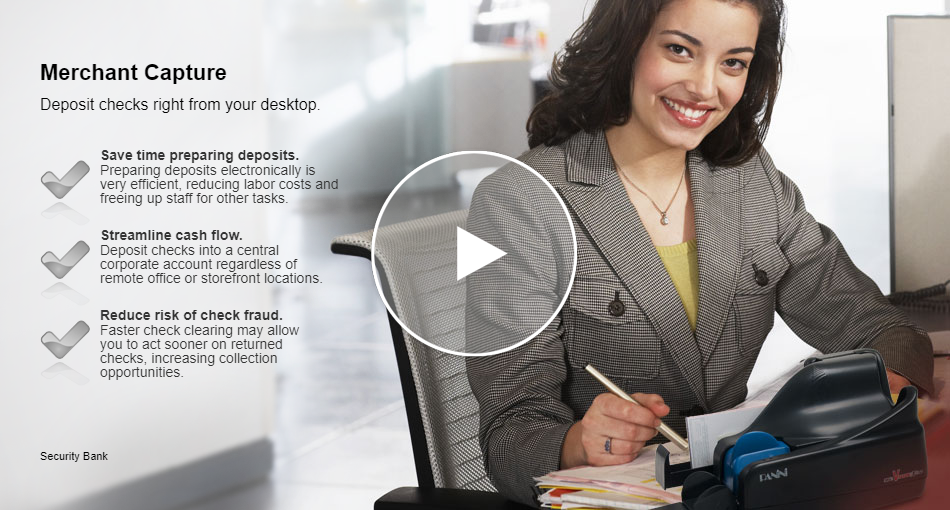
Remote deposit capture makes it easier for you to make your deposit right from your desk. From your office, you’ll scan and transmit check images directly to your TRB bank account. It’s secure and the fastest way to turn your check deposits into cash. You’ll spend more time running your business and less time making deposits.

Key Advantages

  • Make deposits anytime 24/7
  • Consolidate funds from remote locations into a TRB account
  • Save time and trips to the bank
  • Reduce risk of check fraud
  • Securely store check images
  • Eliminate duplication errors

Using Remote Deposit Capture Is Easy

1. Scan checks – Using a high-speed internet connection, simply scan both sides of the check in a single pass.

2. Prepare deposit – View images of the scanned checks from your PC. The dollar amounts for the checks are automatically read and the deposit is totaled.

3. Submit deposit to us – With a simple click on the “submit” link, the deposit is sent to the bank through a secure internet connection and the funds are deposited right into your account.

*Services are subject to credit approval. Scanned physical checks must be securely stored for 45 days before being securely destroyed. Other terms and conditions may apply.

Getting Started

Business Online service is required to access TRB Remote Deposit Capture*. Once your needs are determined based on your check volume and security requirements, our technical support team will visit your business to assist in the easy set-up process. Our team will:

  • Verify you have the required software and computer hardware
  • Install the RDC software and check scanner
  • Demonstrate the scan/prepare/submit process

Please contact one of our representatives for further details and current pricing.

Requirements:

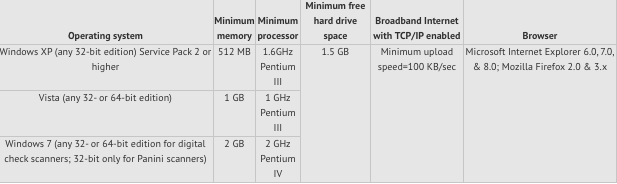
  • PC with an open USB 2.0 port
  • Modern Windows Operating System
  • Supported version of Windows Internet Browser
  • A desktop check scanner purchased from TRB
  • High-speed Internet connection
  • TRB Account with Business Online services
 

Frequently Asked Questions

Yes. Please contact a Treasury Management Officer for pricing details.

You can scan an unlimited amount of checks using the service. The daily deposit limit is customized based on client need.

Yes.

After you send check images using Remote Deposit Capture, the endorsed deposited items must be safeguarded for a minimum of 45 calendar days from the date of transmission. After a minimum of 45 days they must be destroyed or otherwise rendered incapable of transmission or presentment.

No, you need to meet certain requirements for this service. Please call 1-800-580-6536 for additional details and to find out if you qualify.

No.

No. Currently the service only supports deposits to your business account.

No, Macintosh machines and operating systems are not currently supported.

The standard Digital Check CheXpress scanner or any compatible scanner will run on Microsoft Windows XP, Vista or Windows 7. These scanners are not compatible with Macintosh (Mac) machines and operating systems.


Stay Connected. Follow us on

Texas Regional Bank Logo in White

Customer Service

(855) 534-4433

Balance Inquiry

(866) 972-5430

Debit Card

(800) 554-8969
Routing Number: 114917335
Member FDIC,
Equal Housing Lender
Copyright ©
2026
· Texas Regional Bank 
Bank Website Design & Development
by MPC Studios, Inc.

TRB Community Hours
2026 Year-to-Date
3,887

Online Banking Log In

You are about to leave www.trb.bank and enter a website that Texas Regional Bank does not control. Texas Regional Bank has provided this link for your convenience, but is not responsible for the content, links, privacy policy, or security policy of this website.